Canada Passport Photo
Make a compliant Canada passport or visa photo in seconds — free, private, and processed entirely in your browser. We remove the background, set a plain white backdrop, and export the exact size.
Canada passport photo requirements
Canada uses a larger 50×70 mm photo for passports.
What's different about a Canada photo
Canada uses 50 × 70 mm — a distinctly larger photo than the 35 × 45 mm European standard, and larger again than the US square. Photos cut for any other country will not fit the Canadian frame, and the passport office does not accept trimmed-down substitutes.
There is one requirement here that no online tool can satisfy on its own, and it is worth knowing before you start: Canadian passport photos must be taken by a commercial photographer, and the back of one of the two prints must carry the studio's name and address along with the date the photo was taken. A photo you produce entirely at home does not meet that rule.
Canada photo rules in detail
- Copies
- Two identical prints are required. One is left blank; the other must be annotated on the back by the photographer with the studio name, the full address, and the date the photo was taken.
- Photographer
- The photo must come from a commercial establishment. This is the requirement that most distinguishes Canada — self-taken photos, however technically perfect, do not satisfy it for a passport application.
- Glasses
- Not permitted. Canada removed the glasses allowance and now asks for them to be taken off, with an exception only for documented medical necessity supported by a note from a doctor — the same position as the United States.
- Expression
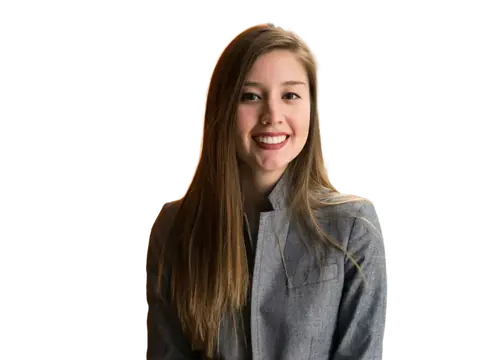
- Neutral, with the mouth closed and both eyes open and looking straight at the camera. No tilting or rotating the head.
- Head size
- 31 mm to 36 mm measured from the chin to the natural top of the head — the skull, not the top of your hair. The overall photo is larger than a European one but the head is a similar size, so there is more margin around it.
Photos must have been taken within the last 6 months. The authority for these rules is the Passport Program, Immigration, Refugees and Citizenship Canada (IRCC) — check there before you apply, since requirements do change.
Babies and children
Newborns and infants may have their eyes partly closed and do not need a neutral expression, but the rest of the rules still apply — including the commercial-photographer requirement. No other person may appear in the photo, so the usual approach is to lay the baby on a plain white sheet. A child's photo still needs the studio annotation on the back.
How the Canada application works
Applications are made on paper and submitted in person at a Service Canada or passport office, or by mail. Both photos go in with the form, and the guarantor who signs your application must also sign the back of one photo.
Because the annotation is checked, this is a case where the sensible use of an online tool is preparation rather than production: get your framing, background and head position right at home so you know exactly what you want, then have a studio shoot and stamp the final prints.
Why Canada photos get rejected
- Missing the photographer's name, address and date on the back of the print.
- Head measuring outside the 31–36 mm chin-to-crown window.
- Photos printed at the wrong size — 35×45 mm brought over from a European application.
- Any retouching, including removing blemishes or softening skin.
- Wearing glasses, which are no longer accepted without a documented medical reason.
How to make your Canada photo
-
1. Upload a portrait
A clear, front-facing photo with even lighting. The background is removed automatically.
-
2. Fit the guides
The 50×70 mm frame is pre-selected — line your head up with the crown and chin guides.
-
3. Download or print
Export the exact size at 300 DPI, or a 6×4 inch sheet of copies for any photo kiosk.
Preguntas frecuentes
What size is a Canada passport photo?
What background should a Canada passport photo have?
How big should the head be in a Canada passport photo?
Can I wear glasses in a Canada passport photo?
Why do Canada passport photos get rejected?
Can I print my Canada passport photo at home?
Passport photo sizes for other countries
This is a free helper tool, not an official government service. Requirements can change — always confirm the exact rules for your application before submitting. Your photo is processed entirely in your browser and is never uploaded.
Más herramientas gratis y privadas
Exporta aquí y sigue editando allí — tu imagen te acompaña, sin volver a subirla.